Your identity
App name, icon, colour palette, wording and support links all belong to your business, on every screen.
An iPhone and iPad VPN client carrying your brand, signing in against your own admin panel, and sharing accounts, packages and servers with the rest of your platform.
iPhone users are usually a smaller share of a VPN customer base than Android users, but they are frequently the higher-value part of it — longer subscriptions, fewer support requests, more likely to pay yearly. They are also the least tolerant of an app that does not feel native.
For a business, the decision is rarely “iOS or Android”. It is when to add iOS. Most of our clients launch on Android, get the service running and the support process working, then add iOS as the second or third platform once the panel, the servers and the packages have stopped changing weekly.
One thing to plan for early: Apple applies specific rules to VPN applications, including requirements about who may publish them and what the app has to disclose. That affects your developer account setup, not your code, so it is worth resolving before the build rather than at submission.
A branded iOS app should look like your company built it for iPhone — not like an Android app that was carried across.
App name, icon, colour palette, wording and support links all belong to your business, on every screen.
Navigation, typography, spacing and system behaviour follow what iPhone customers already expect, so the app feels familiar on day one.
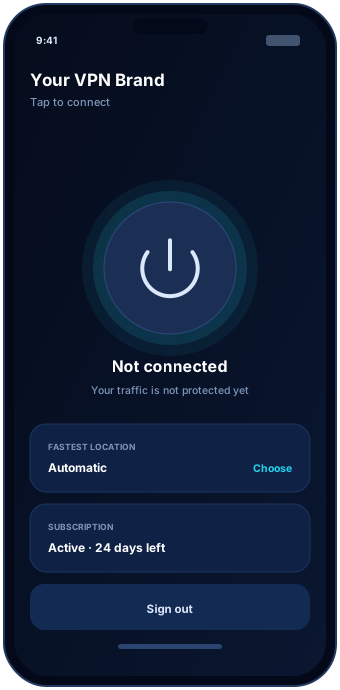
Connected and disconnected are unambiguous, alongside the system VPN indicator iOS shows on its own.
The customer enters the username and password created in your panel. Expired and suspended accounts get a clear message and a route to renew rather than a generic failure.
One primary control, the current location, and the connection state. This is the screen the customer opens ninety per cent of the time, so it stays uncluttered.
Countries and cities from your panel, limited to what the customer’s package allows, with an automatic option for people who do not want to choose.
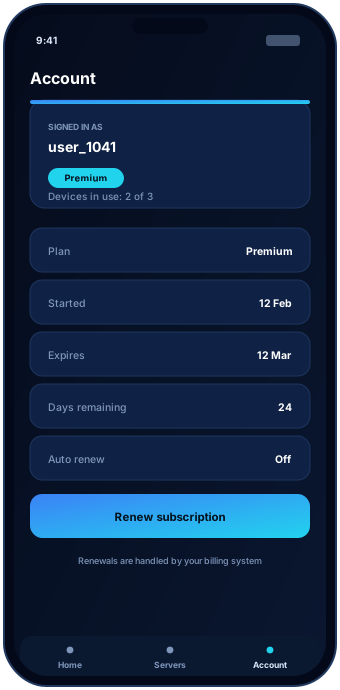
Plan, start and end dates, days remaining and devices in use — the same information your panel holds, so support conversations start from shared facts.
The iOS app authenticates against the same admin panel as your Android, TV and desktop apps. There is no second customer list to keep in step and no separate expiry logic that can drift.
The build, the icon and screenshot set, the listing text and the disclosures Apple expects from a VPN application.
The app is published from your own Apple Developer account so the listing, the reviews and the update history stay with your company.
Approval. Apple reviews every submission against requirements that change, and applies particular scrutiny to VPN apps. We prepare properly and help you answer review questions.
Yes, and you want one. An app published under your own organisation account keeps the listing, the app name and the customer reviews with your business. We prepare the build and the listing material for that account.
Apple reviews every submission and applies specific requirements to VPN applications, including who is allowed to publish them and what the app must disclose. We prepare the submission to meet the current requirements, but the decision is Apple's and nobody can promise approval.
It does the same job with the same accounts and the same servers, but it follows Apple's interface conventions rather than Android's. Customers expect an iOS app to feel like an iOS app.
Usually not. Most VPN businesses launch on Android first because it reaches more customers and the release process is quicker, then add iOS once the service is running. If your specific market is iPhone-heavy, that calculation changes.
Yes. Device limits are enforced by your panel across every platform, so one subscription covers the number of devices you sold regardless of which ones the customer picks.
Tell us where you are with your developer account and which platforms you already run. We come back with scope, timeline and a written quote.