Create the groups you sell
A free group, a premium group, a gaming group, a streaming group — whatever matches how you have decided to package your service.
Add a server once and every app sees it. Group locations into the tiers you sell, take a server down for maintenance without breaking anyone, and keep the whole estate in one list instead of in your head.
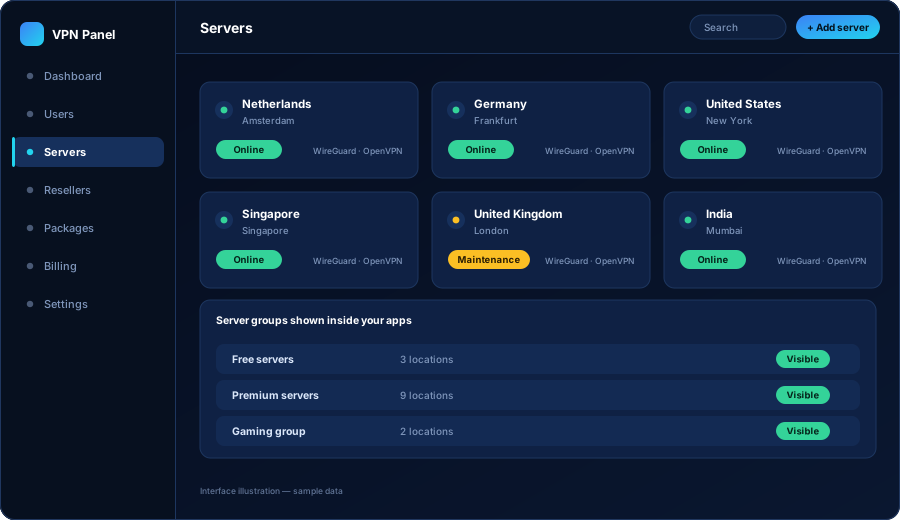
In a VPN business, adding a location is a commercial choice: customers keep asking for Japan, so you add Japan. The technical side should be the smallest part of that decision. If adding a location means rebuilding and republishing five applications, you will stop adding locations — and your product will stop improving.
That is why the server list lives in the panel rather than inside the apps. You register the server once, decide who is allowed to use it, and every application picks it up the next time a customer opens the location list. No app update, no store review, no waiting.
Each server is registered with the details the platform needs and the details your customers care about. Those are not the same thing, and keeping them separate is what makes the location list readable.
A clean list of countries and cities, with the servers their package allows. No addresses, no configuration, no technical detail — just a location and a connect button.
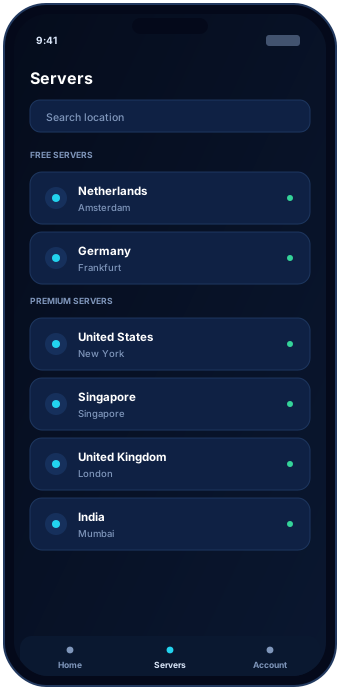
The difference between your cheap plan and your expensive plan has to be something real. Server access is the most natural place to put it.
A free group, a premium group, a gaming group, a streaming group — whatever matches how you have decided to package your service.
A package points at one or more groups. Anyone on that package sees exactly those locations and nothing else.
Add a server to the premium group and every premium customer gains it at once. No account-by-account work.
| Server group | Who can reach it | Typical purpose |
|---|---|---|
| Free / trial | Trial accounts and the entry package | Let people test the app without giving away your best capacity |
| Standard | Your main monthly and quarterly packages | The locations most of your customers use every day |
| Premium | Higher-tier and yearly packages | Your best locations, kept as a reason to upgrade |
| Private / corporate | Specific accounts only | Dedicated capacity for a business customer or a partner |
Servers need work: the host reboots, you upgrade something, a location becomes unreliable. The question is whether your customers experience that as maintenance or as a broken product.
The alternative — leaving a dead location in the app and hoping nobody notices — is how VPN businesses lose customers quietly.
Total work on your side: one form. No app update, no store submission, no downtime.
Advice we give every client before they spend money on hosting.
Your first locations should match where your audience lives and what they connect to, not a list copied from a large international VPN brand.
A short list of locations that are consistently fast produces fewer complaints than twenty locations where half are congested.
Let customer requests drive expansion. When several people ask for the same country in a month, that is your signal — and adding it takes minutes.
Server accounts, payment methods and domain records should belong to your company. The panel manages the servers; it never owns them.
The panel manages servers; it does not replace them. Most clients rent their own servers from hosting providers so the accounts, the billing and the control stay in their name. We help you plan how many you need, where to put them and how to configure them for the platform.
Fewer than most people expect. A small number of well-chosen locations that stay fast beats a long list of slow ones. It is normal to launch with a handful and add locations as customers ask for them — adding one later is a form, not a project.
Common VPN server types including OpenVPN and WireGuard are widely used with this kind of platform, and other types can be discussed. What your build supports is confirmed in your scope before the project starts rather than assumed from a marketing page.
Take the server out of the visible groups first so no new connections are made to it, let existing sessions end, then remove it. Accounts are not tied to a single server, so customers simply pick another location.
Yes, and this is one of the main reasons to group servers. Server access is attached to the package, so a starter plan can see one group and a premium plan can see everything. The apps show each customer only what their package allows.
Tell us where your customers are and how you want to package your locations. We will tell you what your server estate needs to look like at launch.