WHMCS VPN Integration
Connect your billing system to your VPN panel so a paid order becomes a working account on its own — and a renewal extends the account the customer already has instead of creating a second one.
Somebody has to create the account. It should not be you.
Without an integration, a VPN sale has a manual step in the middle. The customer pays, the payment notification arrives, and then a human has to open the panel, create the account and send the details. At five sales a week that is an annoyance. At fifty it is a job, and it happens at every hour of the day because customers buy at every hour of the day.
It is also where trust is lost. A customer who paid twenty minutes ago and has heard nothing assumes something went wrong. They open a support ticket. Now the sale has cost you the manual step and the support reply.
Connecting your billing system to your panel removes the person from the middle. The payment confirmation is the trigger, and the account exists before the customer has finished reading the confirmation page.
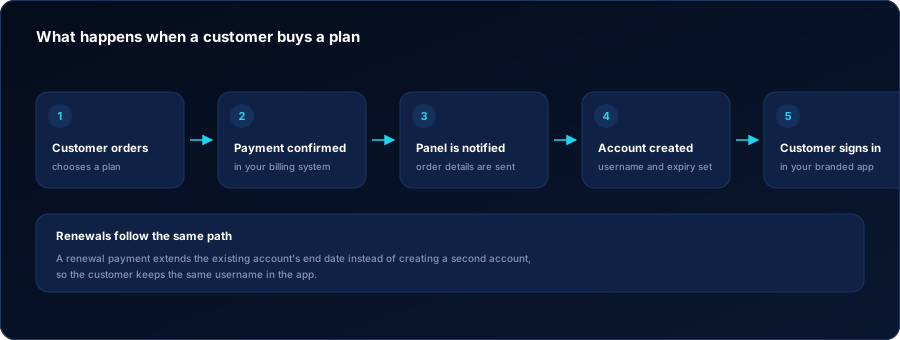
What happens when a customer buys a plan
Five steps, none of which require anyone in your team to be available.
-
The customer orders
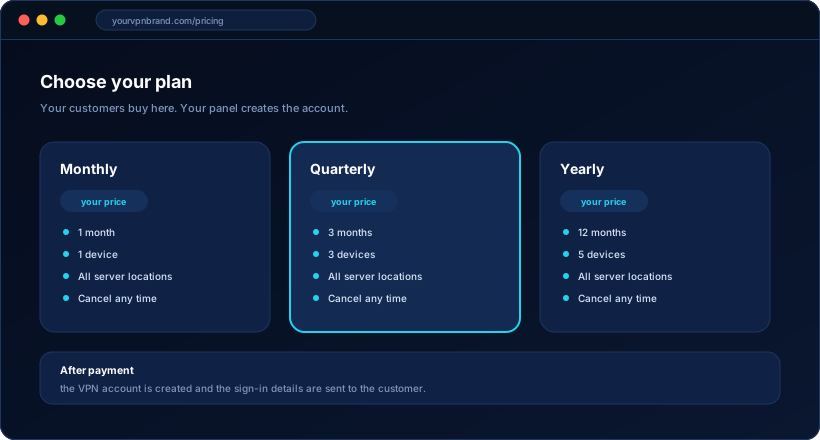
They choose a plan on your website and go through checkout. Your billing system owns this step, using your own payment provider.
-
Payment is confirmed
The billing system confirms the payment has actually cleared. Nothing is created before this point, so unpaid orders never become working accounts.
-
The panel is notified
The billing system sends the order details to your VPN panel: which customer, which package and which duration.
-
The account is created
The panel creates the account with the right package, device limit, server access and end date, exactly as if you had created it by hand.
-
The customer signs in
They receive their credentials and sign in to your branded app. From that moment they are an ordinary account in your panel like any other.
-
Expiry looks after itself
The end date is set. If nothing renews it, the account stops working on that date without anyone doing anything.
A renewal must extend, never duplicate
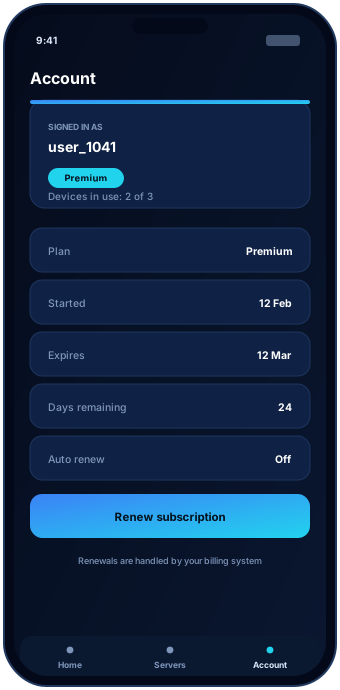
This is the single most important detail in the whole integration, and it is where poorly built ones fail. When a customer renews, the correct behaviour is to push their existing account’s end date forward. The customer keeps the same username and carries on.
The failure mode is creating a second account. The customer now has two logins, one of which is about to expire, and neither they nor your support team knows which one they should be using. This produces more tickets than every other integration issue combined.
- The renewal is matched to the existing account, not to a new one
- The end date moves forward by the package duration
- The customer keeps the same username in every app
- Device limits and server access follow the renewed package
- The renewal is visible in the panel alongside the original order
Suspension, cancellation and the awkward cases
Most of the value of an integration is in what happens when things do not go smoothly.
| What happens in billing | What should happen to the account | Why |
|---|---|---|
| Order paid | Account created with the package and end date | The customer expects access immediately after paying |
| Renewal paid | Existing account extended | Keeps one username per customer and avoids duplicate accounts |
| Renewal unpaid | Nothing — the account expires on its existing end date | No special handling needed; expiry already does the work |
| Order cancelled | Account suspended or allowed to run to its end date | A commercial choice: refunds and goodwill differ per business |
| Refund or chargeback | Account suspended | Access should not outlive the payment that bought it |
| Package upgraded | Account moved to the new package | Device limit and server access follow the new plan immediately |
Automation handles volume. You keep the exceptions.
Connecting billing does not lock you out of your own panel. Every account can still be created, extended, corrected or suspended by hand, and that matters more often than people expect.
- Free trials and demo accounts for prospects
- Goodwill extensions when something went wrong
- Customers who paid you directly rather than through checkout
- Corporate deals negotiated outside your public pricing
- Accounts created by resellers, which never touch your billing system at all
What an integration project involves
What we set up
- The connection between your billing system and your VPN panel
- Mapping your billing products to your VPN packages
- Account creation on payment, with the correct package and duration
- Renewal handling that extends rather than duplicates
- The rules for suspension, cancellation and upgrades
- Testing with real orders before you switch it on for customers
What you provide
- Your billing system, installed and licensed in your name
- Your payment provider and merchant account
- The products and pricing you want to sell
- Your policy on refunds, cancellations and grace periods
- Access for us to configure the connection during the project
We describe what an integration does once it is built for you. What is included in your project is confirmed in a written scope before work starts — not assumed from a feature list on a website.
WHMCS integration FAQ
No. WHMCS is the billing system most VPN and hosting businesses already run, which is why it is named here. The same principle applies to other billing platforms: a confirmed payment triggers account creation in your panel. Tell us what you use and we will confirm what is possible.
The billing system is the authority on payment status. A failed renewal means the account is not extended, so it expires normally on its existing end date. How refunds and chargebacks should affect an account is a policy decision we set up with you during scoping.
Yes, that is the point of connecting billing. The customer pays through your website, the renewal reaches the panel, and their existing account is extended. Nobody in your team needs to be awake for it.
It should not, and preventing that is a core part of the setup. A renewal is matched to the existing account and extends its end date, so the customer keeps the same username in your apps. Duplicate accounts are the most common failure in badly built integrations.
Always. Automation handles the volume; you and your resellers keep full manual control in the panel for trials, corrections, goodwill extensions and customers who paid you some other way.